Pong

I followed the tutorial at http://gamecodeschool.com/sfml/coding-a-simple-pong-game-with-sfml/ for creating a Pong game in SFML.

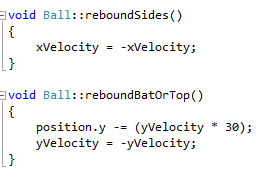
All went pretty well, I got to grips with the setup of an SFML game, created a while loop to run it, and was impressed by the simplicity of functionality such as ‘rebounding’ off the bat or top, left, and right edges of the window:

As physics would suggest, the velocity of the ball is negated to send it back in the opposite direction.

Unfortunately, I did have- or, rather, still am having- trouble with using Text and Fonts. I thought that the issue may be with the font which I’d downloaded but I tried many different fonts without luck.

I kept getting access violation runtime exceptions thrown and couldn’t find anything to help me online.

The Pong game works, but the lives and score statuses should be shown at the top, I had to comment out these lines to be able to play the game at all.

If I figure it out, more updates soon.

Embarking on SFML

Although I have very limited experience of C++, I’m finding it easy enough to pick up as I dive into the world of SFML. I want to learn SFML so as to help Bourban with the implementation of a pirate ship game we came up with. Bourban has much more experience in both games programming in general and the use of SFML and C++, but I want to be able to be useful too.

I spent about half an hour on Friday setting up SFML in Visual Studio and following a guide to create a basic program to test that it was all working and get to grips with SFML and C++.

SFML works code

Once I had successfully completed this, I decided to begin writing a game of ‘Pong’ – the ‘Hello  World’ of games programming. I found an online guide to get me started… progress reports soon!

The Pragmatic Programmer

After reading many rave reviews online, and pondering over the price for several months, I decided to treat myself to a copy of ‘The Pragmatic Programmer’ by Andrew Hunt and David Thomas. I have been reading a little whenever I get the chance and am just about halfway through the second chapter, so thought it time I added my own ‘rave review’ to the masses.

I love this book.

Although much of the content so far has pretty much been common sense, sometimes we programmers get so engrossed in achieving the end goal of working, ‘error-less’ code that common sense and basic good practices go out the window. Avoiding duplication in its various forms, the benefits of keeping code orthogonal, and striving for reversibility are all conveyed to the user in a light-hearted, conversational, anecdote-filled manner which makes it difficult for me to choose between spending my free time reading ‘The Lord of The Rings’ or ‘The Pragmatic Programmer’. My artist of a younger sister was even interested when I read some of this book aloud to her.

There are concepts (such as implementing Orthogonality) which this book has presented in such a simple and applicable way that I wonder how I was ever confused about them when studying at uni.

This book also contains tips and reminders for a positive lifestyle as a programmer from interacting with your team in an appropriate way to expanding your knowledge portfolio in the most productive manner.

My favourite idea from Hunt and Thomas so far has been:

If you are doing very detailed implementation and coding, read a book on design and architecture. If you are doing high-level design, read a book on coding techniques.

This was not something which I had previously considered – Surely you should supplement your work using your free time if you can?

But no. This makes sense. There’s no point in becoming fed up of your work because it’s what you do in your free time too.

I would definitely recommend reading this book. It’s well worth the 20 quid or so.

Principles Of C and Memory Management

I was really looking forward to studying ‘Principles of C and Memory Management’. I had very little experience with C but knew that it was a useful language to be proficient in and I had basically no understanding of how memory management worked and thought it vital that I find out. This definitely seemed the module for me.

Unfortunately, this was supposed to be a paired module with ‘Advanced Programming in C’, but that module was over-subscribed and I didn’t manage to get assigned to it, instead taking ‘Scripting Languages‘.

I now know some C, but not much more than I could have studied myself using online tutorials. And the memory management side? I’m not sure that one lecture on using ‘malloc’ and ‘alloc’ is enough to get it into the title…

Overall, I was slightly disappointed with this module, not to mention the marking system for the assignments. :/

Distributed Systems

During second semester I studied a module called ‘Distributed Systems’, the partner module to ‘Internet Principles’ from first semester. It doesn’t sound the most interesting but I was keen to study it, especially as I began to realise how frequently the phrase ‘distributed system’ came up in almost every other module. From ‘Database Development’ to ‘Advanced Object-Oriented Programming in Java’, every lecturer seemed to be bringing up this topic. It seemed a good idea to gain a real understanding of it.

Although this module turned out to be far from my favourite, it has given me a solid basis in topics such as leader election algorithms, network communications, fault tolerance, and DNS. None of these are concepts which I would have decided to study of my own accord, which really makes me appreciate the opportunities given to me during my University studies.

Scripting Languages

During second semester I took a module called ‘Scripting Languages’. Although I have always been more interested in using regular programming languages such as Java and C#, I thought it important to expand my skill-base (and the module was being taught by a very good lecturer).

This turned out to be a good choice. My ‘Scripting Languages’ module was part of what kept me going this semester through other modules such as ‘Distributed Systems‘ and ‘Principles of C and Memory Management‘. I think that the main reason for this is that scripting languages show you an immediate result. You see, scripting languages are a subset of programming languages which do not require a main() method as most programming languages do. Instead, a scripting language will execute beginning from the top of the script and running through to the end (although it may skip to functions during running). In C, C++, and Java, the main() function is the entry point from which execution begins.
In addition, scripting languages are usually interpreted, meaning that they do not require the compilation step (e.g. using gcc in C, javac in Java). Compilation creates a binary executable file (by translating the source code) from which the code can be executed. Interpretation takes each line of the source code and processes it as a series of actions at run-time, which is much more convenient than distributing pre-compiled code.
Scripting languages are often more suited to web development or controlling webpage behaviour than most programming languages.

The main languages which we studied were Perl, PHP, and JavaScript.

We were given an assignment to complete in each language:

Perl: Develop a Perl script using CGI.pm to perform a statistical analysis of input program code.

PHP: Develop a web-based system using HTML, CSS, PHP, and MySQL to allow users to sign up for training sessions using online forms and enter the data into a MySQL database on the University servers. You can see what I produced here.

JavaScript: Develop a ‘spaceships’ game. My game, although not entirely complete, can be found here.


The emotional advantage of studying scripting languages this semester has been that I could actually see my progress and check whether what I was going in the right direction as I went along, the lack of which is often the most frustrating aspect of programming. 

ASM

This is my first assessed program in assembly language. I have been working with Visual Studio’s Visual C++ Win32 Console Application and using (_asm) assembly code. Here is what I had to do:

Requirements: Write a program in assembly language which takes an integer input, n, and then reads in that number, n, of values. It will have three counters: pcount, zcount, and ncount which are incremented by 1 when the value read in is positive (>0), zero (=0), or negative (<0) respectively. At the end of the list of numbers, these counter values will be written out.

I didn’t have too much trouble writing the code, once I got my head around what needed to be on the stack, when, it was quite a repetitive task (lots of printf and scanf situations). However, once I began to test my program I ran into some errors…

  1. The first error I found was when I set n = 0. Obviously this meant that when the loop decremented the ECX counter it went to -1 and so it never Reached Zero- the condition for the loop ending.
    • I inserted a jump to the end of the loop body if the input was less than or equal to zero, which solved the issue.
  2. The second error I encountered was when testing the result of entering invalid input. I wanted to check what happened if the user wrote ‘bob’ instead of a numerical value. (For my Java assignments, the specifications have always stated that we can assume that the user will not enter invalid input. As I didn’t see that in this spec., I decided to test it.) What appearred to have happened was that the value wasn’t positive, so when compared to zero it didn’t jg (jump if greater than) to the posroutine, or jl (jump if less than) to the negroutine, but continued to what I’d left as the default, incrementing zcount.
    • To solve this, I inserted a zero routine to make each type of value have a condition and the default be to jump to the end of the loop body without incrementing any counters.
  3. However, I tested it again and got the same result. I then realised that, due to the variable ‘value’ being initialised as equal to zero in the supporting C++ at the beginning of the code, perhaps the zero counter is incremented when the inputted value is invalid.
    • As this is the first assignment I’ve had in assembly, I haven’t had much experience of it. I don’t really know how to approach this issue. I tried not assigning a value to ‘value’ in the C++ but when I placed a watch on it while debugging, I noticed that the default value assigned to it is -858993460, which then increases the ncount instead of the zcount, which isn’t any better.

Obviously, I’m all for thorough testing but when I highlight an error which I don’t know how to fix, I wonder whether it would have been better to lose marks for weak testing than to point out the downfalls in my program without solving them…

COMP211 – Internet Principles Assignment 1

[PART ONE]
PART TWO
So, the capability to send mail across a mail server using an SMTP connection has been established. For the second main part of the assignment, we were to introduce the ability to download objects across an HTTP connection from an inputted URL. This involved first splitting the URL into ‘host’ and ‘path’. A URL usually consists of 3 parts: scheme, host and path. For example in http://www.miriamjennings.co.uk/uncategorized/comp211-internet-principles-assignment-1/, we have the scheme: http://, teling us which protocol is used; the host: www.miriamjennings.co.uk, the domain holding the resource; and the path: /uncategorized/comp211-internet-principles-assignment-1/, identifying the specific resource at that host.
In this assignment, it was presumed that hypertext transfer protocol (HTTP) was being used and the user is asked to input the rest of the URL. I did this using a simple substring approach:

The indexOf() method should return the location of the first instance of the specified character (“/”) within the String it is applied to, or -1 if it does not occur. If -1 was returned, the path is simply “/” otherwise, it is the rest of the URL beginning from the first “/” until the end. The host is the URL from the beginning to the first “/”. Unfortunately, when I received my feedback on the assignment, I was told “paths with more than one ‘/’ not handled correctly”.

I then constructed the request message to the server. HTTP request messages take the form:
GET path HTTP/1.1 (if using HTTP version 1.1)
followed by a header line:
Host: host identified in URL split
Connection: close (as we were told to “add a header line so that server closes connection after one response”)

Another socket is then established with the URL host as the host and 80 as the port. (Port 80 is for HTTP connections whereas port 25 was for SMTP connections). Again, a BufferedReader and a DataOutputStream are connected to the socket to allow reading from and writing to the socket; an InputStream and InputStreamReader are created for this socket…

To send an HTTP request, a buffer is created to read an object in. The request message can then be sent along the DataOutputStream to the http server and the status line response read in using the BufferedReader. The status code is extracted using a substring and confirmed to be correct or an exception is thrown. If the response status code is 301 or 302, there is a new location at which the object we are attempting to get can be found. In this case, the point at which this new location appears in the response headers is found and the new loaction extracted. This is then fed into HttpInteract from the beginning as the url to be used.
The lines of the header can then be read in using the BufferedReader, extracting the length from the Content-Length line of the header and assigning it to a variable called “bodyLength”. The lines are read in until an empty line is found (signifying the end of the header). If the bodyLength is found to be greater than the maximum object size constant (102400), the Socket is closed and the user is informed that the message is too long.
Finally, the body (object) is read in using the BufferedReader method read(bufferName, offset, length) and the buffer set up earlier. The data can then be extracted from the buffer 4096 chars at a time and added to the body[] array of characters. “At this point body[] should hold the body of the downloaded object and bytesRead should hold the number of bytes read from the BufferedReader.”
Before returning the gathered information, a message to inform the user that the file has been read is outputted and the Socket, BufferedReader, and DataOutputStream are all closed.

COMP211 – Internet Principles Assignment 1

EmailClient project
This assignment was a lot of fun…
The first assignment of 2nd year was to implement an Email Client with Browser Capabilities. This was a task which, at first (and second) glance appeared unfathomable – especially as we had only 3 weeks in which to complete it! Fortunately, the skeleton code we were given had a lot of pointers to help us to make a start on the process.
There were 2 main parts to the assignment: Establishing and using a mail server connection (sending mail), and downloading from an HTTP server via a TCP connection (downloading and sending objects). We could also implement our own choice of optional extra functionality.

PART ONE
Opening an SMTP (Simple Mail Transfer Protocol) connection requires some Socket programming. Sockets are a feature of the java.net package which are used to open a connection to a server on the client side (coming soon: using ServerSocket (server side connection)! watch this space…). A TCP socket is created by supplying the destination host (with which the connection is being established) and the port number (to which server side process the data transferred in the connection is passed). I used the University mail server “mail.csc.liv.ac.uk” and port 25 for the assignment when using the University machines, and “localhost” and port 1025 when using my own machine loaded with fake SMTP server software.
A BufferedReader and a DataOutputStream are then ‘attached’ to the socket to allow transferral of information between client and server. An important part of establishing connections to servers is understanding response codes. A successful connection is OK’d by the server with the code ‘220’. Once this has been confirmed, the SMTP commands can be used, beginning with a handshake.
A ‘handshake’ (in computing) is an initial connection in which the ‘rules’ for the connection are agreed. These rules include information such as verfication rules, the speed of the connection, and authorization. In SMTP connections, the handshake can be initiated by the client using the command:
HELO (don’t ask) followed by some name by which the client addresses the server.
All being well, the server responds with a 250 response code and a greeting for the client.
MAIL FROM example@example.com
is the SMTP command used to communicate to the server that the client wishes to send an email using the address example@example.com.
This is then OK’d with a 250 and a confirmation of that email address as valid.
The next command is RCPT TO example01@example.com, which gives the address to which the mail will be sent. A 250 response is sent again, with confirmation od this email address.
The content of the mssage to be sent is begun with the command DATA, which is responded to with a 354 code. Anything written between the receipt of this code and a line containing only a full stop is the message content. (The command SUBJECT: can be used within this area to determine the subject line of the email.) A 250 response should then be received and the message is sent.
The client responds with QUIT to end the SMTP connection, which triggers a 221 response.
This is the order of SMTP commands for sending mail, in this assignment a user interface was available to us, where the input could be inserted as fields of a form. All I had to do was take the contents of these fields and use them following the appropriate command.

[PART TWO]